


 Color Grade: For Beauty, Fashion, and Portrait Retouching Information
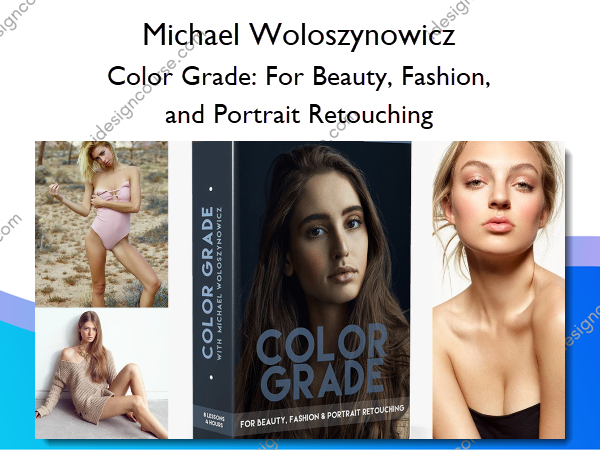
Color Grade: For Beauty, Fashion, and Portrait Retouching by Michael Woloszynowicz is a specialized tutorial focused on mastering color grading within the context of beauty, fashion, and portrait photography.
The last video course by Michael Woloszynowicz focused on dodging and burning, a fundamental step in the process of retouching. In his latest tutorial, Michael continues through his retouching workflow and teaches his next step, color grading. Color grading is the process of altering or enhancing the color of a motion picture, video, or in this case, a digital photo. This retouching step has one of the most noticeable impacts on the final look of your photos and is essential to master.
If you have not already watched Michael’s first course, we recommend you start there as dodging and burning almost always precedes color grading in Michael’s retouching workflow. Some of the concepts taught in this tutorial assume that corrective D&B has already been done to the image. If you have a good understanding of D&B, you should be able to follow along on this color grade course without much trouble.
The goal of this course is to provide a comprehensive understanding of the versatile set of color grading tools available in Photoshop as well as when and why to use each one. The first half of the course focuses on the specific tools available during a color grade. Once these tools are thoroughly explained, Michael walks through practical examples of implementing various tools on some of his images.
This course is not meant for beginners, it requires a basic understanding of Photoshop tools, layers, adjustment layers, blending modes and masks. However, take note that there is an explanation of each tool and a practical lesson where it is used on a PSD file that you will have access to. We hope that by the end of the lessons, you will be able to start practicing each tool with your own images to develop your own image look and style.
What You’ll Learn In Color Grade: For Beauty, Fashion, and Portrait Retouching?
Lesson 1: Preparing For Color Grading (Raw Processing)
- Introduction: Course Outline
- The Necessary Setup and Terms
- Prerequisite Knowledge That Will Help You Get the Most Out of This Course
- Your Artistic Taste and Developing Your Own Style
- The Importance of Having a Solid Technical Foundation to Continuously Refine Your Color Grading Skill Set
- Preparing Your Raw Files For Eventual Color Grading
- The Importance of the Starting White Balance
- Contrast and Brightness: The Color Grading Potential of an Image
Lesson 2: Main Color Grading Methods and Photoshop Tools for Luminosity-Targeted Color Grading
- The Main Color Grading Methods: Luminosity-Targeted adjustments vs. Color-Targeted adjustments
- Altering Luminosity in Preparation for Color Grading Using the Curves Adjustment Layer
- The Black and White Adjustment Layer
- Using Channels for Selective Luminosity Corrections
- Using the Black and White Adjustment Layer for High Key Images
Lesson 3: Photoshop Tools For Color-Targeted Adjustments
- The Solid Color Adjustment Layer; Ways to Combine It With Various Blending Modes and Opacity Levels
- The Gradient Map Adjustment Layer; Ways to Combine It With Various Blending Modes and Opacity Levels
- The Hue/Saturation Adjustment Layer; Ways to Combine It With Various Blending Modes and Opacity Levels
Lesson 4: Even More Photoshop Tools For Color Grading
- A Framework for Color Grading: Broad vs. Subtle Adjustments
- Using the Channel Mixer Adjustment Layer for Color Grading
- Using the Selective Color Adjustment Layer for Adding Subtle Accents to the Image and Altering Skin Tones
- Using the Color Balance Adjustment Layer for Refining the Look of Highlights and Shadows
Practical Lessons 5-8: Color Grading Practical Examples for Various Types of Images
In the remaining lessons, Michael demonstrates step-by-step color grading processes on various types of images, offering a detailed explanation of his thought process and why and how he chooses the color grading tools, layer blending modes and opacity levels depending on the type of image at hand and the desired results.
The goal of these lessons is to help you build your own color grading system based on your own visual preferences, following Michael’s thought process, polished structure, and explanations.
- Lesson 5: Color grading a high key image; two examples of step-by-step color grading aiming for a brighter image and then adding more contrast into the image in the first instance and a higher contrast look in the second by using color grading steps to add more contrast to the image
- Lesson 6: Color grading examples of an image photographed outdoors
- Lesson 7: Color grading examples of a low key image
- Lesson 8: Color grading examples of a studio beauty image, including a black and white conversion option
More courses from the same author: Michael Woloszynowicz
Salepage: Color Grade: For Beauty, Fashion, and Portrait Retouching – Michael Woloszynowicz
Related products
»Pre-Order

Graphic Design
»Pre-Order
»Pre-Order