
 Adobe Illustrator for iPad Course For Laser Owners Information
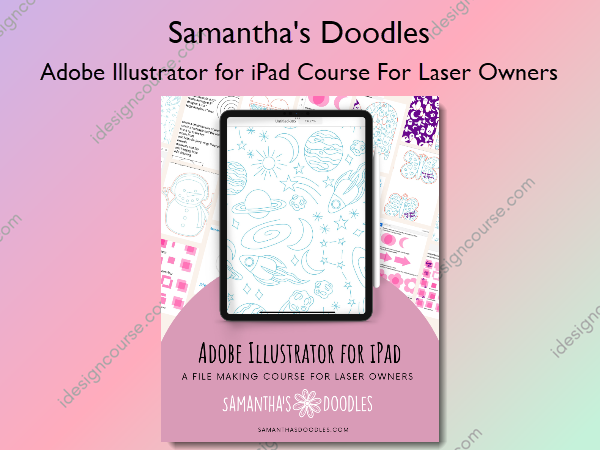
Adobe Illustrator for iPad Course For Laser Owners by Samantha’s Doodles is a comprehensive course designed specifically for laser owners who want to create and optimize their designs using Adobe Illustrator on the iPad.
We will go through the different tools and techniques you can use in the AI for iPad app in order to design your own laser files. We will cover drawing with the pen, pencil, and shape tools, creating new shapes using the shape builder options, adding text, anchor point editing, and more. Please note, this course is tailored to specifically creating new files in the app instead of vectoring other programs files.
What You’ll Learn In Adobe Illustrator for iPad Course For Laser Owners?
Files
- Cheat Sheets.zip
- Practice Worksheets.zip
- Finished Files.zip
- Project Images.zip
- Offset Workaround.pdf
Introduction
- Video: Instructor Introduction
- Video: Housekeeping Stuff – Our Main Two Rules
- Required Equipment
- Required App
- Required Materials
- Suggested Materials – Keychain Thingies
- Resource: My Favorite Vendors for Laser Supplies
- Resource: My Amazon Storefront – Recommended Laser Supplies
Homepage Overview
- Video: Home Page Overview
- Practice Exercise: Creating New Documents
- Practice Exercise: Saving to Folders
File Settings – Optimizing Designs for the Laser
- Video: What are Fill and Stroke and Why Do They Matter?
- Resource: Samantha’s Doodles File Set Up Key
- Video: The Color Wheel
- Video: What is Outline Mode?
Understanding the Tool Bar (Menu on the Left)
- Tool Bar Cheat Sheet
- Video: Importing a Reference Photo
- Practice Exercise: Using the Shape Tools Worksheet
- Video: Using the Selection and Direct Selection Tools
- Video: The Selection Tool Menu
- Practice Exercise: Selection & Direct Selection Worksheet
- Video: Pen Tool Basics
- Video: Pencil Tool Basics
- Pencil Tool – Adjusting Smoothing
- Practice Exercise: The Pen & Pencil Tools Worksheet
- Video: Using the Eraser Tool
- Video: How to Add Text
- Video: Importing Fonts
- Resource: My Current Favorite Fonts
- Resource: Adobe Fonts
Understanding the Task Bar (Menu on Right Side)
- Task Bar Cheat Sheet
- Video: Let’s Talk Layers
- Video: The Properties Menu
- Video: Align, Distribute, and Flip
- Practice Exercise: Shape Builder & Combine Shape Tools (AKA Pathfinder on Desktop)
- Video: The Repeat Tool
- Vectorize: Tips for Success & Why We’re Focusing Elsewhere
- Vectorize: When A Center-Line Trace Works Well
Understanding the Navigation Bar (Menu on the Top)
- Navigation Bar Cheat Sheet
- Gestures Cheat Sheet
- Video: Undo & Redo (And Their Gesture Controls!)
- Video: Accessing the Gestures Menu
- Video: Turn on Palm Rejection
- Practice Exercise: Gesture Controls
- Touch Shortcuts Cheat Sheet
- Video: Reviewing Touch Controls
- Practice Exercise: Touch Controls
Class Project #2: “You Are Magic” Keychain – Beginner
- Video: Let’s Talk About Offsets
- Video: Creating Text & Offsets for our “You are Magic” Keychain
- Video: Resizing and Adding Space for Keychain Hardware
- Marketing Ideas
- Image: Project 2 – You Are Magic Keychain
Class Project #1: Snowman Doodle – Beginner
- Video: Project: Snowman Doodle
- Add A Hole for Hanging & Print Your Design
- Marketing Ideas
- Image: Snowman Scoring Ornament
Class Project #3: Love Bug Keychains – Beginner/Intermediate
- Video: Project Overview – Love Bug
- Video: Project: Love Bug Keychains
- Marketing Ideas
- Image: Project 3 – Love Bug Keychain
Class Project #4: 2 Part Circle Earrings – Beginner
- Video: Creating the 2 Part Circle Earrings
- Video: Adding Hardware & Assembly
- Marketing Ideas
- Image: Project 4 – 2 Part Earrings
Class Project #5: Halloween Ghost Doodle Backers (Engrave, Reverse Engrave, and Scored Options!) – Intermediate
- Video: Project Overview – Ghost Doodle Backers
- Video: Project: Ghost Doodle Backers
- Marketing Ideas
- Image: Project 5 – Ghost Backers
Class Project #6: Celestial Theme Single Line Scoring Designs – Intermediate
- Video: Project – Single Line Scoring Patterns – Celestial Theme
- Video: How to Crop Single Line Scoring Patterns on Desktop
- Tips and Tricks for Creating Scoring Patterns
- Marketing Ideas
- Image: Project 6 – Scored Backers
Class Project #7: Manually Tracing a PNG Image – Intermediate
- Video: Manually Tracing A Procreate Drawing into Single Line Format
- Marketing Ideas
Class Project #8: Converting Certain Elements to Score – Intermediate
- Video: Class Project #8: Adjusting a Single Line Cut File to Have Scored Elements
- Marketing Ideas
- Image: Project 8- Converting Single Line File to Have Scored Elements
Class Project #9: Cake Topper – Beginner
- Video: Project #9: Creating a Cake Topper – Beginner
- Marketing Ideas
- Image: Project 9 – Cake Topper
Class Project #10: Cacti & Cowboy Boots Single Line File – Intermediate/Advanced
Alright y’all. We’re finally at the point where it’s time to put everything we’ve learned together into one beautiful single line file. I promise you, once you start breaking designs down into smaller elements, you can create anything. Just practice your pen, pencil, and shape tools along with your anchor point editing, and you’ll be creating designs like this from scratch in no time.
- Video: Cacti & Cowboys Single Line File + Breaking Apart an Oversized File
- Video: Printing the Final Piece
- Marketing Ideas
- Recommended Resources
- Image: Project 10 – Cacti & Cowboy Boots
Business Tips: Sourcing Images Legally and Ethically
Sometimes you want to draw and you aren’t quite getting your proportions right or you just need to look at something to give you an idea of what you’re drawing wrong. This is when references can be super helpful! Here’s a guide on how to find legitimate references and use them ethically in your work.
- When are references used?
- Finding Reference Photos, Incorporating Tracing, and Maintaining Artistic Integrity
- The Holy Grail for Reference Photos: Unsplash
Exporting Your Files & Getting Ready to List Them
- Video: Exporting Options
- Video: Using The Creative Cloud
- Recommended File Types
Creating A Digital File Shop
- Video: Let’s Talk Passive Income
- Video: Let’s List A File Together – Etsy
- Etsy Notes and Things to Consider
- Video: Listing a File with the Shopify Digital Downloads App
- Shopify – Digital Downloads App
- Photography Tips
More courses from the same author: Samantha’s Doodles
Salepage: Adobe Illustrator for iPad Course For Laser Owners – Samantha’s Doodles
Related products

»Pre-Order


»Pre-Order