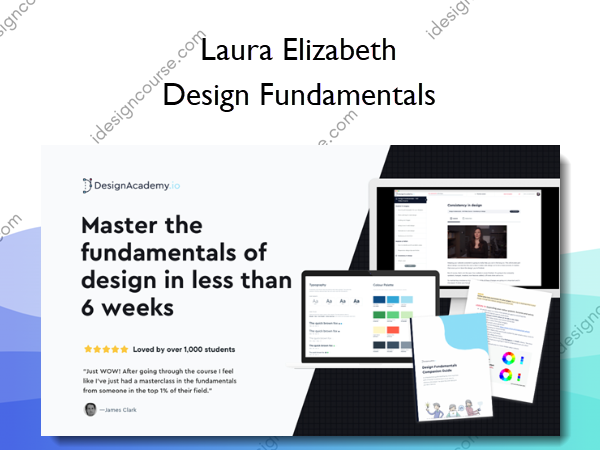
Design Fundamentals Information
Learn the fundamentals of design in less than 6 weeks
As a developer, you’re likely involved in design decisions on a daily basis. Maybe you’re being asked to add a new feature to your company’s web app, or you’ve had an idea for a side project that you want to look half-decent. Many tasks you work on involve some level of design skills.
And so design becomes that thing that you can’t seem to get away from. It’s always there: something you wish you could do but don’t know how to start.
I’ve been there. I appreciated good design but could never seem to replicate it, despite having invested over 5 years into design college and university. Every course I took was insightful and technically ‘made sense’, yet when I was left to design something on my own, I hit a brick wall.
Now, after almost a decade of self-taught designing, I finally feel like I can call myself a designer. And the way I taught myself was a far cry from what I learned in design school. That’s why I’ve created this course. I’m going to give you the shortcuts I wish I had when learning design and leave you with a solid foundation in everything from colour to typography to imagery on the web.
This course will help you get to a stage where you can not only be confident in your abilities (and trust me, you have plenty of ability to learn design) but it’ll also teach you all the tricks I’ve learned in the last 10+ years of professional design work
What will I learn?
The goal of this course is to give you a solid design foundation to start building upon. It’s not going to teach you everything under the sun about design but it’ll teach you the most important things you can do to improve your designs today — no matter how “artistic” you are (or, more likely, aren’t!). Some highlights include:
EASY TO FOLLOW PROCESS
My workflow I use for almost every project from finding inspiration to colour and typography
THINK LIKE A DESIGNER
How you can train your eye to spot what’s wrong in a design and, most importantly, fix it
WORKSHEETS AND CHEATSHEETS
Useful downloads to help you keep track of your progress and apply what you’re learning to real projects
VISUALS MADE EASY
Image and illustration treatment that anyone can do – even if you can’t draw a wonky line
Here’s what you’ll get:
MODULE 1: Planning
In this module you will learn the best way to begin any design project. You’ll gather the assets you need so when you start, you won’t be helplessly staring at a blank screen. You’ll learn:
- The importance of good content and how to write it
- Which design style to use and why not to simply rely on personal tastes or trends
- How to gather inspiration that you can actually use to build up your design
MODULE 2: Layout
In this module you will learn my process for getting your content into a workable layout. This will form the foundation of your design. We’ll also go through the most common layout mistakes and how to fix them. You’ll learn:
- How to come up with a layout that will fit your content perfectly.
- The most important – but most overlooked – aspect of good design.
- Common layout mistakes and how to fix them.
MODULE 3: Typography
This module is all about choosing and using fonts in your designs. Typography plays a huge part in design and you’ll be surprised to see how the details can make a huge difference. You’ll learn:
- How to choose the best typefaces for headings and body copy.
- How to format typography and give it a clear hierarchy.
- Typographic details that will take your design to the next level.
MODULE 4: Colour
In this module you will learn how to choose and use colours in your design. Choosing and applying colours can be tricky but I’ll show you my process and, more importantly, what to do when your colours don’t look quite right. You’ll learn:
- Some tricks to choosing a colour palette that works for your design.
- How to apply colours and make your palette stretch further.
- What to do when your colours look ‘off’.
MODULE 5: Imagery
This module is going to give you everything you need to know to use imagery effectively in design. This is a stumbling block for so many people and can really make or break your design. You’ll learn:
- How to source photography, illustrations, and icons.
- How to edit photography so it doesn’t look like generic stock photography.
- How to manipulate illustrations and icons so they look custom designed for you.
- Tips and tricks on how to edit and display screenshots from your app or software product.
MODULE 6: Polish
In this module you will be polishing up your designs. You will go back and identify what the problem areas are and come up with ideas on how to fix them. You’ll learn:
- A simple exercise you can use to critically analyse your design.
- Some responsive tips, tricks, and considerations as you start to build out your design.
- How to ensure your design will stay consistent throughout iterations and updates.
Who is this course for?
- You want to master the fundamentals of design without spending years in design school (and don’t necessarily want to think of yourself as a designer)
- You want to build, launch, and sell your own products and not have them look ugly
- You have clients asking for you to add some design polish to the projects you built for them
- You want to learn from “over-the-shoulder” walkthroughs of how designers really design
- You want to stop feeling embarrassed when you give someone a link to your portfolio

About Author
Hey! I’m Laura Elizabeth and I’ve been a designer for almost a decade, I’ve worked on projects for HelpSpot, LaraTalent, RightMessage and Double Your Freelancing. I also speak at numerous conferences around the world (you might have seen me on stage at SmashingConf, Laracon, LTV Conf, Patterns Day and many more).
And now I’m here to help you level up your design skills so you can start creating products that are not only built well, but look pretty darn good!
More courses from the same author: Laura Elizabeth
Salepage: Design Fundamentals – Laura Elizabeth
Proof

Related products
Graphic Design
Web Design
The Power & Psychology of UI Grids and Layouts for Websites and Mobile apps – Alexunder Hess
»Instant Delivery
Web Design
»Instant Delivery