

 Digital Painting in Photoshop: Create Amazing Concept Art Information
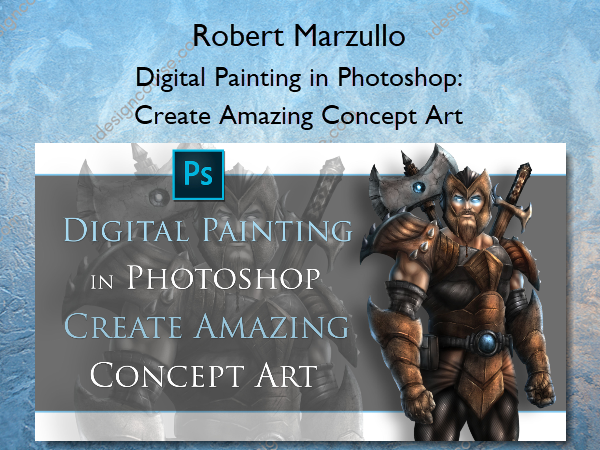
Digital Painting in Photoshop: Create Amazing Concept Art by Robert Marzullo is a comprehensive course designed to teach you how to create stunning concept art using Adobe Photoshop.
Create stunning concept art with Adobe Photoshop and learn to use the powerful tools that make it easy!
In this 7.5 hour course you will learn how to use Adobe Photoshop CC to better create your digital art. This course has 27 lessons that move you through the entire process of creating a fully rendered character in full detail. ( Bonus Content ) 3 Additional lectures on painting wood, fire, and ice. Includes the PSD file to study from as well as the custom brushes and patterns I use along the way.
In the first section you will learn the tools that I use and how I use them. You will learn about the layers and groups, the selections tools, dodge and burn, custom brushes and settings, blending modes, adjustment layers, layer styles, quick mask, and much more.
You will then move through the illustrative process with me from the rough sketch to the digital painting. We will start with a pre-drawn pose that I have supplied and we work out the concept from there. You will learn how to rough sketch your ideas without jumping in too fast with refinements.
This course can be completed with any drawing tablet. I am using a Wacom Intuos 4 to create this art and although I will be mentioning things about that device you can use any tablet with pressure sensitivity. Mainly so the brushes will react in the way that I explain them.
I have designed this course to be a basic approach for beginner and intermediate digital painters to learn from. I created in the way that I would want to learn. This will not teach you everything about Photoshop but it will give you a firm understanding of how I use it to create my digital paintings every day.
What You’ll Learn In Digital Painting in Photoshop: Create Amazing Concept Art?
Getting Started – Tools and Interface
- Layers and Groups
- Custom Brushes and Settings
- How to Use the Selection Tools
- Using the Quick Mask Feature
- Using the Pen and Path Tool Part 1
- Using the Pen and Path Tool Part 2
- Blending Digital Paint
Section 2 – Creating Our Concept Art
- Sketching the Concept Art
- Refining the Sketch
- Using Liquify and Warp to Edit Your Artwork
Section 3 – The Painting Process
- Applying the Base Colors
- Applying the Base Colors – Part 2
- Applying Paint and Texture to the Gold Armor
- Adding Highlights with the Dodge Tool
- Adding Texture on the Gold Armor
- Adding Texture on the Burgundy Armor
- Adding Texture on the Chest Plate Armor
- Creating and Applying a Pattern to Your Character
- Creating a Pattern for Your Characters Armor
- Painting the Skin Tone
- Painting the Skin Tone – Part 2
- Detailing the Weapons
Section 4 – Final Adjustments to the Work
- Cleaning up the Edges with the Blur Tool
- Cleaning up the Edge with Paint Work
- Cleaning up the Edges with Paint Work Part 2
- Using Adjustment Layers to Enhance the Work
- Final Adjustments to the Work
More courses from the same author: Robert Marzullo
Salepage: Digital Painting in Photoshop: Create Amazing Concept Art – Robert Marzullo
Related products

»Pre-Order
»Pre-Order

Graphic Design
»Pre-Order
»Pre-Order