
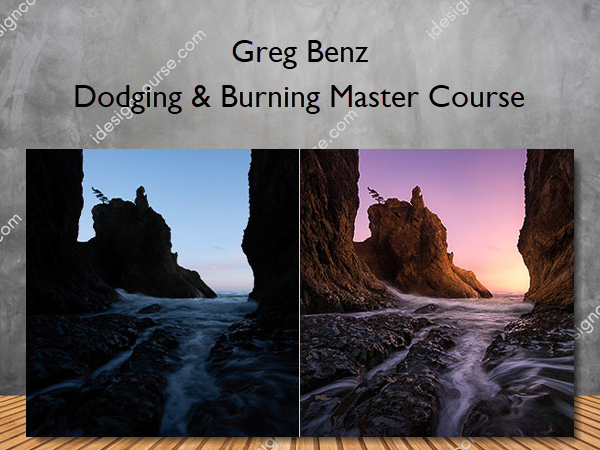
 Dodging & Burning Master Course Information
Dodging & Burning Master Course is designed to enhance your skills in processing RAW files, with a focus on the art of dodging and burning to add depth and interest to images.
Everything you need to know to get the most out of your RAW files
Climb the mountain one step at a time. Whether you have significant experience using luminosity masks to dodge and burn, or have no idea what that means – this course is designed to help you to master the art of adding depth and interest to your RAW files. The course is built in clearly organized, bite-sized pieces. This gives beginners a clear place to start learning the basics, and more experienced students can skip right to the more advanced courses.
What You’ll Learn In Dodging & Burning Master Course?
[1] Start Here (RAW Files and more)
- [1.1] Welcome and how to Get the Most out of this Course
- [1.2] ***** Source/RAW Files ***** (0:44)
- [1.3] Viewing this course offline: Teachable app for iOS
- [1.4] Getting the most out of Teachable
- [1.5] Definitions and abbreviations for this course
- [1.6] Additional content (links to related material outside this course)
- [1.7] Cosmetic differences in course videos from the final Lumenzia v8
- [1.8] Latest versions of Lumenzia and Photoshop
- Greg Benz’s Teachable community
[2] Quick Start [beginner-intermediate]
- [2.1] Learning Objectives for this section
- [2.2] Dune Demo (10:09)
- [2.3] Alternative approaches (if you do NOT have Lumenzia)
[3] Artistic Principles [all]
- [3.1] Learning Objectives and Background
- [3.2] Artistic Principles (9:51)
- [3.3] Quiz / Recap
[4] Crash course for beginners: Overview of Dodge & Burning Methods [sections 4.4 and 4.6 recommended for everyone]
- [4.1] Learning Objectives and Overview of Dodging and Burning Methods
- [4.2] Lightroom [optional] (9:59)
- [4.3] PS Native Dodge/Burn tools [optional] (15:44)
- [4.4a] Transparent/Gray/Solid layer in Soft Light blend mode [KEY SECTION] (12:26)
- [4.4b] Transparent/Gray/Solid layer in OVERLAY and HARD LIGHT blend modes [KEY SECTION] (3:28)
- [4.4c] Transparent/Gray/Solid layer with LUMINOSITY ONLY [optional] (4:42)
- [4.5] Curves (or other adjustment layer) in Luminosity Blend Mode [optional] (6:25)
- [4.6] Multi-processing RAW files (sunset dune demo) [HIGHLY RECOMMENDED] (12:53)
- [4.7] Dodging specific colors via Selective Color [intermediate-advanced] (7:00)
- [4.8] Related: Sponge for enhancing color [intermediate-advanced] (1:38)
- [4.9] Recommended Settings: Photoshop paint brushes [RECOMMENDED]
- [4.10] Recommended Tools: Wacom Tablets for dodging and burning [RECOMMENDED]
- [4.11] Recap / Quiz of Methods
- [4.12] Dodging & burning in 32-bit images [optional]
[5] Dodging and Burning with Precision: Luminosity Selections and Masks [beginner-intermediate]
- [5.1] Learning objectives
- [5.2] Tools for creating luminosity masks and selections [beginner]
- [5.3] Luminosity Masks [beginner] (10:50)
- [5.4] Luminosity Selections [beginner-intermediate] (6:54)
- [5.5] BlendIf [intermediate] (5:05)
- [5.6] Masks vs Selections: When to use which? [beginner-intermediate]
- [5.7] Optional: Masks, Selections, Opacity, BlendIf, etc… how everything interacts [intermediate-advanced]
- [5.8] Recap / Quiz of Dodging and Burning with Luminosity Selections/Masks and BlendIf
[6] Black and White [for all]
- [6.1] Learning objectives
- [6.2] Artistic principles for Black and White
- [6.3] Sandstone Demo (26:23)
- [6.4] Quiz / Recap
[7] Build from a dark base to simplify [all skill levels]
- [7.1] Learning objectives
- [7.2] Forest Demo (23:00)
- [7.3] Quiz / Recap
[8] Backlight [all skill levels]
- [8.1] Learning objectives
- [8.2] Artistic Principles for Back-Light
- [8.3] Cholla Cactus Demo (28:23)
- [8.4] Quiz / Recap
[9] Sidelight [all skill levels]
- [9.1] Learning objectives
- [9.2] Artistic Principles for Side Light
- [9.3] Sea Stack Demo (72:53)
- [9.4] Quiz / Recap
[10] Cityscape [intermediate-advanced]
- [10.1] Learning objectives
- [10.2] Artistic Principles for Cityscapes/Architecture
- [10.3] Cityscape Pano Demo [intermediate] (57:31)
- [10.4] Quiz / Recap
[11] Create your own light [intermediate-advance]
- [11.1] Learning objectives
- [11.2] Sandstone Sky Replacement Demo [advanced] (64:37)
- [11.3] Quiz / Recap
[12] Troubleshooting: Common issues and how to address them [all skill levels]
- [12.1] Learning Objectives
- [12.2] Nothing seems to be changing (beginners)
- [12.3] Results are too weak or nothing seems to be changing (beginner-intermediate)
- [12.4] I’m painting outside the target area because I can’t get a selection which is precise enough
- [12.5] There are overlapping circles or obvious brush strokes
- [12.6] Pixels are changing outside the “marching ants” or brush cursor
- [12.7] Results are too strong or the brush paints too quickly
- [12.8] Color Shifts [intermediate-advanced]
- [12.9] Avoiding and fixing halos
- [12.10] There is a red overlay on the image
- [12.11] Quiz / Recap
[13] Other bonuses: workflow and presets
- [13.1] Complete Luminosity Masking Workflow
- [13.2] Keyboard shortcuts
- [13.3] Workflows and shortcuts for those who do not have Lumenzia
More courses from the same author: Greg Benz
Related products
Adobe Photoshop
Adobe Photoshop
AF Watercolor Packs – Photoshop and Procreate – Adilson Farias
Adobe Illustrator
Basics of Adobe CC: Photoshop, Illustrator & InDesign – Jason Hoppe
Adobe Photoshop
Adobe Photoshop