

How to Create Design Boards in Photoshop Information
Photoshop is one of the best tools for creating realistic design boards – you just need someone to show you how to use it.
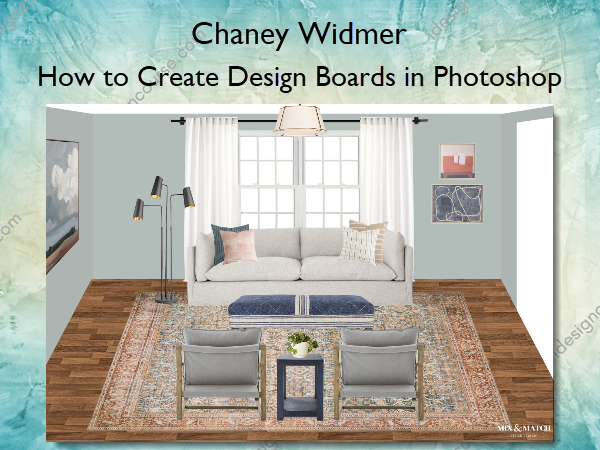
How to Create Design Boards in Photoshop will walk you through everything you need to know to get up and running. After taking this self-paced, online course, you’ll be able to create design boards just like the ones you see below. Whether this is a skill you’ve been wanting to develop for a long time or are brand new to the idea of creating design boards, you’re in the right place. I’ll walk you through how to use this software simply and efficiently to communicate your design ideas.
In this course, you’ll learn…
- Exactly which tools you need (ignoring the ones you don’t!) and how to use them
- How to add the exact products you’re recommending to your boards
- How to remove backgrounds from pieces and arrange them in a three-dimensional, room-like setup
- My tricks for adding basic architectural features that help your boards look more realistic
The curriculum starts with teaching the basics of Photoshop in bite-sized videos and builds all the way up to start-to-finish full room tutorials. (Check out the full list of videos and tutorials below!) You’ll have the opportunity to practice your new skills by recreating the design boards I share as well – I provide the final design board, a folder of the product images, and a blank design board so you can jump right in!
This course also includes a Companion Guide with written explanations, tips and tricks, and other goodies that will come in handy as you start to create boards with your own designs.
What You’ll Learn In How to Create Design Boards in Photoshop?
Welcome! Start Here.
- Introduction to the Course (1:51)
- Download: The Companion Guide
Get to Know Photoshop: Orientation and Setup
- Orientation to the Workspace
- Set Up a New, Blank Design Board
- How to Add Product Images to Design Boards and Understanding How They Layer
The Toolbar and Tools, and How To Use Them
- Toolbar Introduction
- Move Tool
- Rectangular Marquee Tool
- Magnetic and Polygonal Lasso Tools
- Magic Wand Tool
- Crop Tool
- Rectangle Tool and Paint Bucket
- Horizontal Type Tool
- Hand Tool
Removing Backgrounds From Products
- Introduction: Why Does Removing Backgrounds Matter?
- White Backgrounds
- Simple Backgrounds
- Complex Backgrounds
- Select Subject Tool for Removing Backgrounds
Building the Room (Part 1): Furniture and Decor
- Introduction: From 2D Mood Board to 3D Design Board
- Arranging and Layering Your Furniture and Decor
- Using the Perspective, Distort, and Warp Tools to Create a Realistic Look
Building the Room (Part 2): The Structure and Architectural Features
- Drawing Walls and Ceilings
- Adding Flooring
- Adding Doors and Windows
Start-to-Finish Full Room Tutorials
- Introduction
- Bedroom
- Dining Room
- Living Room
Additional Tips and Tricks
- Adding Your Logo/Branding to a Design Board
- How to Save and Export Your Design Boards
- Download: Blank Design Board Templates
In Conclusion…
- Congratulations – You Finished! (1:14)
- Course Survey
More courses from the same author: Chaney Widmer
Salepage: How to Create Design Boards in Photoshop – Chaney Widmer
Related products
»Pre-Order
»Pre-Order
»Pre-Order
»Pre-Order