 The Ultimate Guide to Blender 3D Rigging and Animation Information
Tank tracks to characters Learn how to 3D animate and rig anything in this massive 17 part Ultimate Blender guide.
Have you ever wanted to breathe life into the 3D assets you create, moving their limbs, letting them swing to the wind or morphing them into different shapes?
‘The Ultimate Guide to Blender 3D Rigging and Animation’ is very different to any other Blender course out there! Most Blender courses show you 3D modelling, texturing, and rendering tips and tricks. ‘The Ultimate Guide to Blender 3D Rigging and Animation’ focuses on creating a variety of animations from basic, to intermediate, to advanced, all completely made in Blender – one of the top open-source and free 3D modeling software out there.
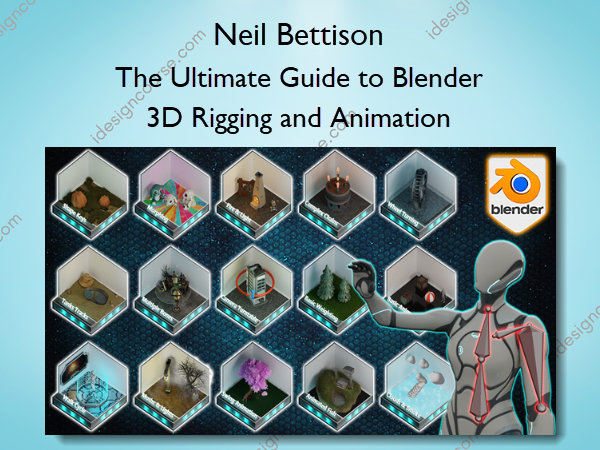
We will not be using any other software to animate all that you see in the thumbnail, except Blender. You will also learn about multiple armatures, walk cycles, and turntables, and as an added plus, you will learn about how to animate a full scene reminiscent of adventure films with different deadly traps.
This is great because it means you will get to see how we animate organic and inanimate objects from scratch for video games. I am sure ‘The Ultimate Guide to Blender 3D Rigging and Animation’ will be the one course that you will want to keep handy anytime you need animate an asset.
Our ‘The Ultimate Guide to Blender 3D Rigging and Animation’ top 6:
- Following through a full introduction to animating in Blender with basic animations;
- Learning how to animate tank tracks so that they stick to any type of terrain;
- Creating create handles and drivers to have your tank tracks move realistically;
- Mastering the art of character rigging and animating walk cycles;
- Finding how to make moths move around a light source using Blender’s particle boid system;
- Maximising the benefits of animated textures to create flames and fire streams.
Now, there are courses out there that can show you how to animate specific assets from start to finish, but there is nothing that covers the entire process from grass to wheels, to trees, to fish, to tank tracks, to fire, to light, and clouds, and even deadly adventure game traps. ‘The Ultimate Guide to Blender 3D Rigging and Animation’ is intended to be the complete guide to animating in Blender.
Stage 1: Basic Animation
This part of ‘The Ultimate Guide to Blender 3D Rigging and Animation’ will cover the basics of animation. No bones or rigs, just key frames. We will also be looking into interpolation modes and how we can use them to smooth out animations.
- Move – Rotate – Scale
- Interpolation modes
- Basic simulations
Stage 2: Swing Animation
Using the skills we learn from stage 1, we take this up a notch by creating our first rig and single bones. This is the basis of most animations. This part of ‘The Ultimate Guide to Blender 3D Rigging and Animation’ will teach you why a root bone is important.
- Swing Animation
- Simple Rig
- Root Bone
Stage 3: Wheel Turning
When working with anything that can spin, it is important to understand how frames and keys work. In this stage, we will be explaining how to create a spinning wheel. Our goal is for its movement to look realistic. The best thing about wheel animations is that this can be achieved in the shortest amount of time.
- Key Frames
- Blank Frames
- Linear Interpolation
Stage 4: Basic Weighting
In this part of ‘The Ultimate Guide to Blender 3D Rigging and Animation’, we will be looking at how weighting works and you will learn how to add weight to bones. This is important for creating a certain level of realism. We will also be looking at when and how to use bendy bones.
- Bendy Bones
- Tree Swaying
- Weight Chart
Stage 5: Shape Keys
Shape keys are a very powerful animation tool that we have at our disposal. We can not only change the shape of objects in ways that rigs simply cannot do but we are also able to combine multiple shape keys.
- Shape Keys
- Animated Texture
- Growth Animation
Stage 6: Multiple Bones
As a 3D artist, at some point or another, you will have models that will need a lot more than just one single bone. In this part of the course, we learn how we can create animations with multiple bones working independently.
- Multiple Bones
- Combining Keyframes
- Timelines
Stage 7: Animated Fish
Realistically animating wildlife can be difficult. Luckily, we have a fair amount of Blender that can speed up your workflow and enhance the realism of an animation. Within the graph editor, we will look at modifiers and how to combine them with displacement.
- Noise Modifier
- Animated Paths
- Displacement
Stage 8: Morphing
Morphing is the process of taking one object and turning it into another over a set number of keyframes. Now, this is not as simple as clicking a button. In this part of ‘The Ultimate Guide to Blender 3D Rigging and Animation’, we will look at how to set up this process and how to change the textures along with the object.
- Shrink Wrapping
- Morphing
- Texture Setup
Stage 9: Tank Tracks
In my opinion, tank tracks are the number one asked-for animation, coming second after character rigs. This is why it is included in the course. We will be going through how to stick our tracks to any terrain. You will finish this part with the skills to create handles and drivers to have your tank tracks move realistically.
- Drivers
- Handles
- Curve Modifier
Stage 10: Fire & Light Flicker
There will always be an abundance of models that require flames in some shape or form. This means that knowing how to animate flames is a key component of ‘The Ultimate Guide to Blender 3D Rigging and Animation’. You will not only learn how to create flames from scratch, but you will also learn how to animate them. Empties and displacement will be the key to creating realistic flames without the need for complex simulations.
- Texture Coordinates
- Animated Lighting
- Moving Flames
Stage 11: Moths & Light
It is the little things that can bring a scene to life. In this part of the course, we will be covering object tracking. Object tracking can be used to create moths flying around a light source. Wherever the light goes, the moths will follow, all thanks to boid brain which is an amazing Blender feature that comes with the particle setup.
- How to use empties
- Object Tracking
- Particle Boids System
Stage 12: Clouds
The main focus of ‘The Ultimate Guide to Blender 3D Rigging and Animation’ is to create animations without the need for simulations. This means we need to find other ways of creating things like smoke. In this part of the course, we create a stylized smoke effect using Blender’s particle system. This also means that it is really easy to see results in real-time.
- Meatballs
- Velocity
- Inverse Timelines
Stage 13: Complex Chains
This part of ‘The Ultimate Guide to Blender 3D Rigging and Animation’ will involve bringing much of what we have learned so far and applying it all together. This will involve us creating a complex rig and will also introduce you to inverse Kinematics or IKs for short. We will also look at bone tracking and take the level of learning animation up a notch.
- Inverse Kinematics
- Bone Divisions
- Complex Armatures
Stage 14: Walk Cycle
Well, we left the best part of ‘The Ultimate Guide to Blender 3D Rigging and Animation’ near the end. Here, we will be focusing on character rigs and animation. This will be done over many lessons as there is a massive amount of learning to take in. Not only will you be rigging a character, but you will learn just how easy it is to make a basic walk cycle. This is a must if you intend to create your own games and characters.
- Character Rigging
- Walk Cycles
- Pole Bones
Stage 15: Camera Turntable
This is the final part of ‘The Ultimate Guide to Blender 3D Rigging and Animation’ before we animate a huge scene. To be honest, anyone who is thinking of getting into modelling should learn the basics of camera animation. More importantly, to show off your work, you will need a simple but effective camera turntable setup. This is what we will be learning in section 15.
- Turntables
- Smooth Motion
- Camera Controls
Stage 16: Indiana Jones Large Scene
We finally made it to the last part of the course, and you should now have the skills to animate your very own large scene. This will include rolling boulders, shaking ceilings and much more. This adventure scene with deadly traps around every corner will be a great way to put everything you have learned into practice.
- Large Scene
- Multiple Armatures
- Skills Test
Are you excited about all the different skills you can learn in this unique animation masterclass course?
So, come join me on this amazing course and you will never be stuck again when it comes to bringing your scene to life!
Your project will be to animate 16 different scenes, going through an equal number of distinct skill-level stages. Of course, you could set yourself a challenge and diversify aspects or details of the animations such as using assets you already have from your other projects. You could change the length or complexity of animations to make your environments more alive as your skills increase.
I imagine you using these animations in 3D Tudor’s other courses!
To get you pumped, imagine how well this ‘The Ultimate Guide to Blender 3D Rigging and Animation’ 16-stage animation masterclass fits in with your other 3D Tudor projects.
Here’s what you’ll learn:
- Creating 15 different animation projects including but not limited to grass, wheels, trees, fish, tank tracks, fire, light, and clouds, and adventure trapst
- Learning how to animate tank tracks so that they stick to any type of terrain
- Mastering the art of character rigging and animating walk cycles
- Finding how to make moths move around a light source using Blender’s particle boid system
- Enjoying a full introduction to animating in Blender with 16 animation projects of increasing difficulty
- Using Blender 3 and understanding its new interface and shortcuts
- Completing an introduction to the basics of animation in Blender and learning how to animate with nothing but key frames
- Creating create handles and drivers to have your tank tracks move realistically
- Maximising the benefits of animated textures to create flames and fire streams
- Smoothing out animations with interpolation modes
- Building rigs with single and multiple bones
- Mastering the art of weighting bones for 3D animation
- Changing the shape of objects with multiple shape keys
- Animating wildlife and morphing objects (i.e., taking one object and turning it into another over a set number of keyframes)
- Creating a stylized smoke effect using Blender’s particle system
- Graduating to working on more complex animation techniques such as inverse Kinematics, and animating a large scene
- Using Blender’s camera animation options to create a simple but effective camera turntable setup
- Utilising rendering to improve the quality of presentation for your 3D animations by rendering out in Eevee and Cycles
- Presenting your animations in 16 different prepared environments (provided in the course resources)
- Complete the course which is going to be the first steppingstone to creating different 3D animations for future and existing projects
About Author
In 2019, Neil Bettison founded 3D Tudor out of his passion for 3D modelling, which he wanted to share with others. He is a professional prop and environment artist.
Neil is a successful instructor with over 200,000 students cross-platform. His courses are among the highest-rated for 3D modelling on Udemy, with reviewer ratings at 4.7 or above. This includes a Udemy bestseller course.
Neil’s courses are aimed at 3D modellers of all levels, with a great number of new tips and tricks for each learner. Each course is different, with most common themes including medieval England Tudor game assets and buildings, or sci-fi scenes and weapons. Neil’s instructor style makes him stand out because of his to-the-point instructions and clear guidance.
He is the only instructor on Udemy who uses live on-screen tooltips throughout his lessons, helping learners to follow along, without the need to go back and revisit previous shortcuts. This enables absolute beginners and mid-range learners to learn alongside one another, with nothing holding them back, and at different paces, chosen by each student.
More courses from the same author: Neil Bettison
Salepage: The Ultimate Guide to Blender 3D Rigging and Animation – Neil Bettison – 3D Tudor
Related products

»Pre-Order

»Pre-Order