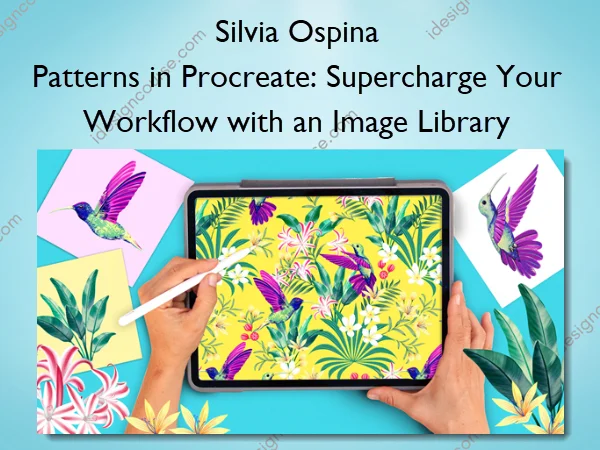
Patterns in Procreate: Supercharge Your Workflow with an Image Library – Silvia Ospina
Love illustration and want to create surface patterns? This class teaches you how to design seamless, professional patterns in Procreate while building a reusable image library.
Learn to paint, organize motifs, create repeating tiles, manage scale, spacing, direction, explore colors, and see your designs on mockups.
By the end, you’ll have print-ready patterns and a creative system to reuse your artwork and stay inspired. Perfect for beginners and experienced illustrators aiming to streamline their workflow.
Are you struggling to create patterns in Procreate?
Maybe you:
- Have beautiful illustrations, but don’t know how to reuse them efficiently
- Feel stuck or unorganized when trying to make repeating patterns
- Want to design products, but lack a clear workflow to make your art repeatable
The truth is, you don’t need to start over each time. You just need a system that lets you design smarter — not harder.
Learn an effective repeat method, build a solid workflow and turn all your existing illustrations into stunning patterns!!!
In this class, I’ll show you my complete workflow for creating patterns directly in Procreate using an image library — your personal archive of illustrations ready to mix, match, and reuse anytime.
What You’ll Learn In Patterns in Procreate: Supercharge Your Workflow with an Image Library
- Create your own image library of reusable assets for endless pattern possibilities
- Design seamless repeat tiles in Procreate without complicated math or extra layers
- Experiment with colorways and compositions to bring variety and personality into your designs
- Visualize your patterns on real products using mockups and Canva
- Organize and back up your files so you can build your pattern portfolio with ease
More courses from the same author: Silvia Ospina
Sale Page: Patterns in Procreate: Supercharge Your Workflow with an Image Library – Silvia Ospina
Related products

»Pre-Order
»Pre-Order